Install Framebird
Install the app on your iPhone and your Windows PC.

A camera app for iPhone + Windows
Turn the iPhone you already own into a quiet, dependable, high-quality camera for calls, streams and recordings on your computer.
Free · No account · Video stays on your devices

Simple by design
Install both apps, connect, and see when your camera is ready.
Install the app on your iPhone and your Windows PC.
Plug in USB for the most stable connection and automatic 1080p, or put both devices on the same Wi-Fi for automatic 720p.
Your PC finds the iPhone automatically. Check the live preview and Ready status, then start your camera.
Made to stay out of the way
Everything you need to get a clear picture and keep it going.
Choose a cable for stability or connect on the same local network.
Your PC finds your phone over Bonjour on Wi-Fi or Apple’s USB service.
A compact live preview makes Searching, Connecting, Ready, Live and Reconnecting clear.
If the link drops, Framebird reconnects and resumes the camera without another start.
Choose Auto or 720p/30, 1080p/30 and 1080p/60. Auto steps down if your iPhone gets warm and lets you know.
Hardware H.264 encoding on iPhone and a native C++ Windows app keep CPU and memory use low.
Switch between your iPhone’s front and rear cameras whenever you need.
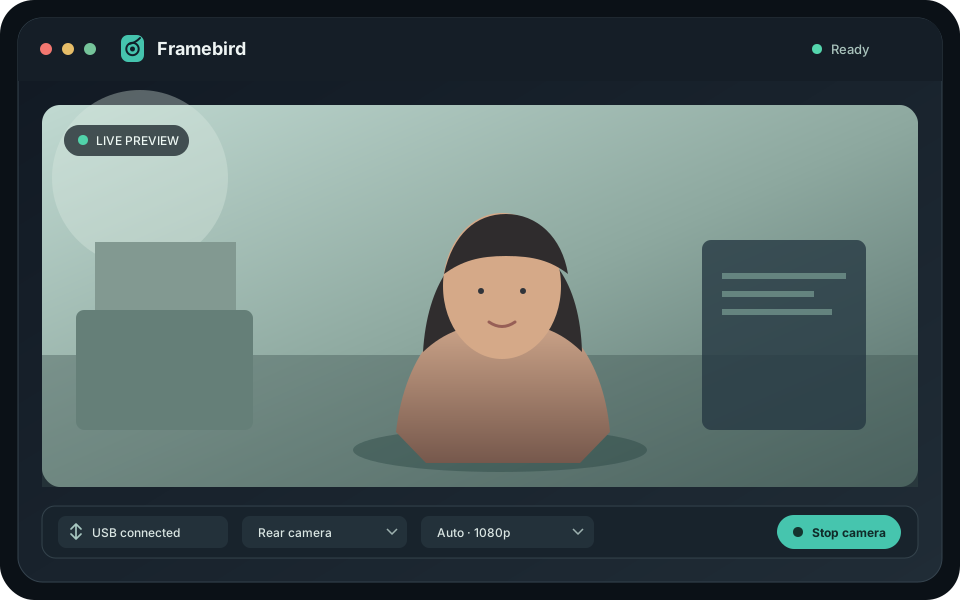
Clear at every step
A calm status and live preview keep you in control.


Private by design
Video travels directly from your iPhone to your computer over USB or your local network. It never passes through a server. BirdsCode runs no servers for Framebird.
What you need
In development
Framebird is in development and is not yet available in the stores.
These features are planned and are not available yet.
Good to know
Yes. Framebird is free, with no account, subscription or ads.
No. Video travels directly between your iPhone and computer over USB or your local network. Framebird does not use servers.
Not yet. Support for Zoom, Teams, Google Meet, OBS and Windows Camera is planned with the upcoming Framebird Camera virtual camera.
USB is the most stable and automatically selects 1080p. Wi-Fi works when both devices are on the same network and automatically selects 720p.
Framebird currently requires an iPhone and Windows PC. A Mac desktop app is planned; Android is not planned.
Visit Framebird support or contact info@sajadshafi.com.
No fuss. Just a good camera.